What Is a Unix Timestamp and How Do You Convert It?
Log files, databases, APIs and spreadsheet exports often show time as a long number such as 1800000000 instead of a date. That number is a Unix timestamp, and once you know how it works you can read it in seconds.
This guide explains what a Unix timestamp is, how to tell seconds from milliseconds, and how to convert one in Excel, Google Sheets, JavaScript, Python and the terminal.
Short answer: A Unix timestamp is the number of seconds since 1 January 1970, 00:00:00 UTC (the Unix epoch). For example, 1800000000 is 15 January 2027, 08:00:00 UTC. In Excel, convert it with =A2/86400+DATE(1970,1,1). In Google Sheets, use =EPOCHTODATE(A2).
What is a Unix timestamp?
Unix time counts seconds from a fixed starting point called the epoch: midnight UTC at the start of 1 January 1970. A timestamp of 0 is that exact moment, 86400 is one day later, and negative numbers fall before 1970.
The POSIX standard, which Unix-like systems such as Linux and macOS follow, defines this count with one simple rule: every day has exactly 86,400 seconds. That rule makes date maths easy, because the number does not depend on time zones, daylight saving time or the local calendar.
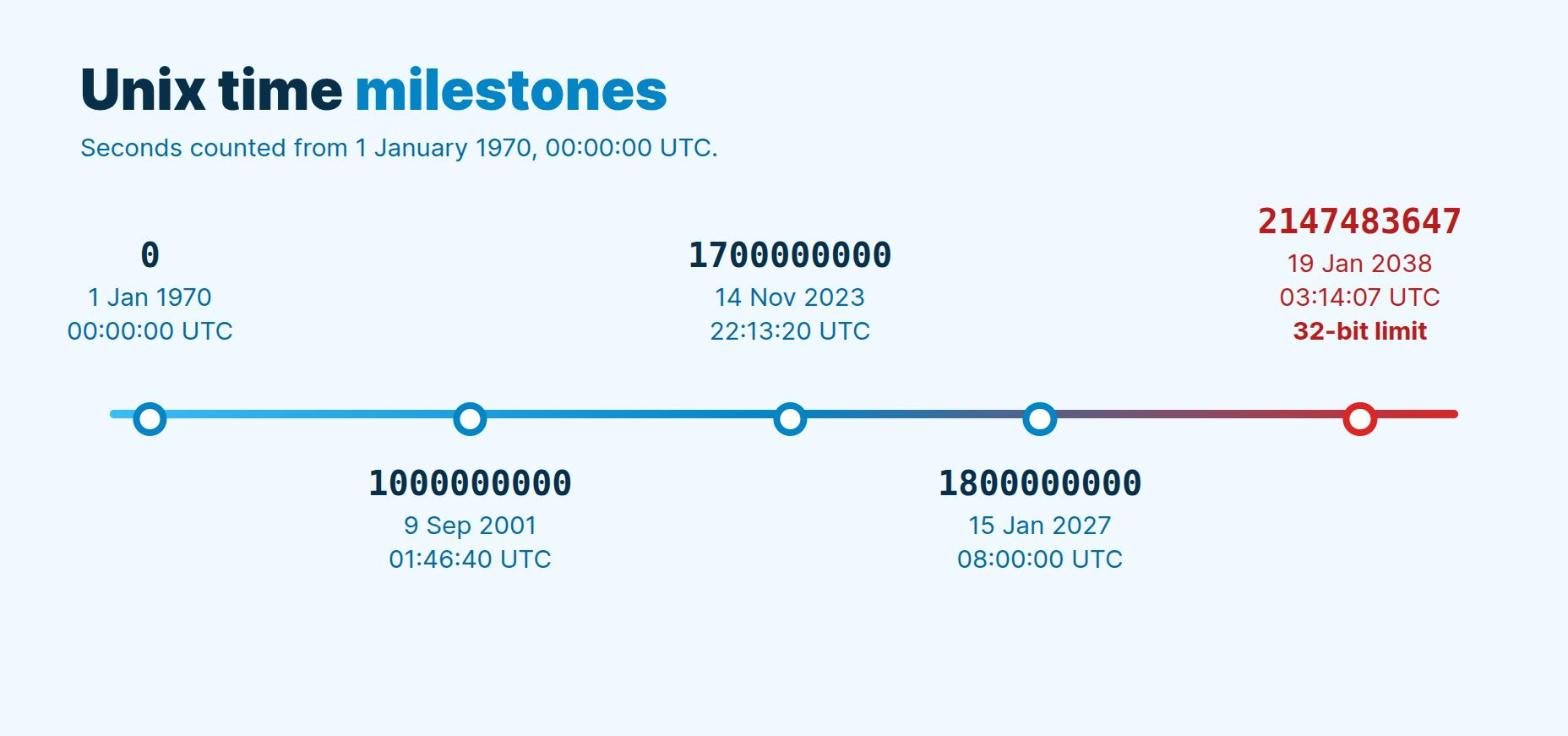
| Timestamp | Date and time (UTC) |
|---|---|
| 0 | 1 January 1970, 00:00:00 |
| 1000000000 | 9 September 2001, 01:46:40 |
| 1700000000 | 14 November 2023, 22:13:20 |
| 1800000000 | 15 January 2027, 08:00:00 |
| 2147483647 | 19 January 2038, 03:14:07 |
Why computers use Unix time
- One number, no time zone. A timestamp means the same instant everywhere. Each user’s device turns it into local time only when it shows it.
- Easy maths. To find the gap between two events, subtract one timestamp from the other. The answer is in seconds.
- Easy sorting. A bigger number is always a later moment, so logs and records sort correctly.
- Compact storage. One integer takes less space than a formatted date string.
Seconds or milliseconds? Count the digits
Different systems use different units, and mixing them up is the most common mistake. For present-day dates, the length of the number tells you the unit:
| Digits | Unit | Example | Used by |
|---|---|---|---|
| 10 | Seconds | 1800000000 | Unix and Linux, PHP, most APIs and databases |
| 13 | Milliseconds | 1800000000000 | JavaScript (Date.now()), Java |
| 16 | Microseconds | 1800000000000000 | Some databases and logs |
| 19 | Nanoseconds | 1800000000000000000 | Python time.time_ns(), Go UnixNano() |
If a converted date lands tens of thousands of years in the future, you treated milliseconds as seconds. Divide by 1,000 and try again. If it lands in January 1970, you did the opposite.
How to convert a Unix timestamp to a date

In Excel
Excel stores dates as the number of days since 1900, so divide the seconds by 86,400 (the seconds in a day) and add the date of the epoch:
=A2/86400+DATE(1970,1,1)Then format the cell as a date and time (for example yyyy-mm-dd hh:mm:ss). The result is in UTC. To show your local time, add or subtract your offset in hours divided by 24. For example, for UTC+5 use =A2/86400+DATE(1970,1,1)+5/24. For a millisecond timestamp, divide by 86,400,000 instead.
In Google Sheets
Google Sheets has a built-in function for this:
=EPOCHTODATE(A2)It assumes seconds. Add a second argument for other units: =EPOCHTODATE(A2,2) for milliseconds or =EPOCHTODATE(A2,3) for microseconds. The result is in UTC, and the Excel formula above also works in Sheets.
In JavaScript
JavaScript works in milliseconds, so multiply a seconds timestamp by 1,000:
const ts = 1800000000;
console.log(new Date(ts * 1000).toISOString());
// 2027-01-15T08:00:00.000Z

// Current Unix timestamp in seconds:
Math.floor(Date.now() / 1000);
In Python
from datetime import datetime, timezone

print(datetime.fromtimestamp(1800000000, timezone.utc))
# 2027-01-15 08:00:00+00:00

import time
print(int(time.time()))   # current timestamp in seconds
Pass timezone.utc as shown. Without it, Python converts to your computer’s local time zone, which can make results differ between machines.
In the terminal
# Linux (GNU date)
date -u -d @1800000000

# macOS (BSD date)
date -u -r 1800000000

# Current timestamp on both
date +%s
How to convert a date to a Unix timestamp
To go the other way, reverse the formula:
| Tool | Formula or code |
|---|---|
| Excel or Google Sheets | =(A2-DATE(1970,1,1))*86400 (A2 holds a UTC date and time) |
| JavaScript | Date.UTC(2027, 0, 15, 8, 0, 0) / 1000 (months start at 0) |
| Python | int(datetime(2027, 1, 15, 8, tzinfo=timezone.utc).timestamp()) |
| Linux | date -u -d "2027-01-15 08:00:00" +%s |
All four examples return 1800000000. Each one sets the time zone to UTC on purpose. If you leave it out, the result shifts by your local offset.
Unix time and leap seconds
Earth’s rotation is slightly irregular, so official UTC has gained 27 extra “leap seconds” since 1972. Unix time ignores them: POSIX treats every day as exactly 86,400 seconds, and Python’s documentation confirms that POSIX systems leave leap seconds out. For everyday use this makes no difference. It only matters for scientific timing, where a gap measured across a leap second can be one second short.
The year 2038 problem
Many older systems stored Unix time as a signed 32-bit integer. The largest value that type can hold is 2,147,483,647, which is 19 January 2038, 03:14:07 UTC. One second later, the number overflows and jumps to a negative value that systems read as 13 December 1901.
Modern operating systems and languages use 64-bit timestamps, which pushes the limit billions of years into the future. The risk lies mainly in old embedded devices, legacy databases and file formats that still use 32-bit fields. If you build software that stores dates far ahead, such as 30-year loans or long warranties, check that your timestamp fields are 64-bit.
Common mistakes
- Mixing seconds and milliseconds. Count the digits first.
- Forgetting the time zone. A timestamp is always UTC. Convert to local time only when you display it.
- Treating a UTC date as local in reverse conversions. In Excel, a date you type is just a number with no time zone, so subtract your offset before converting it to a timestamp.
- Storing timestamps as text. Keep them as numbers so you can sort and subtract them.
- Using negative timestamps in Google Sheets. EPOCHTODATE does not accept dates before 1970. Use the Excel-style formula instead.
Need the number of days between two dates rather than seconds? See our guide on how to calculate days between two dates, or use the free Countdown and Days Between calculator. For the 24-hour clock and UTC “Zulu” time, read how to read military time.
Frequently asked questions
What is the Unix epoch?
The Unix epoch is 1 January 1970, 00:00:00 UTC. It is the zero point that Unix timestamps count from.
Is a Unix timestamp always in UTC?
Yes. The number counts seconds from a UTC moment, so it has no time zone of its own. Your software applies a time zone only when it turns the number into a readable date.
How do I get the current Unix timestamp?
Run date +%s in a Linux or macOS terminal, Math.floor(Date.now() / 1000) in JavaScript, or int(time.time()) in Python.
Why is my converted date in 1970?
You probably divided a seconds timestamp by 1,000, or your value is not a timestamp at all. A 10-digit number is in seconds and needs no division.
Can a Unix timestamp be negative?
Yes. Negative values represent moments before 1970. For example, -86400 is 31 December 1969, 00:00:00 UTC.
What happens to Unix time in 2038?
Systems that store time as a signed 32-bit number overflow after 19 January 2038, 03:14:07 UTC. Systems with 64-bit time, which most modern ones use, are not affected.