How to Make an Invoice: What to Include (Free Template)
You finished the work. Now you need to get paid, and that starts with a clear invoice. A good invoice tells your client exactly what they owe, by when, and how to pay. A messy one gets questioned, parked or forgotten.
This guide shows you how to make an invoice step by step: what to put on it, how to number it, which payment terms to use, and how to send it so it gets paid. You can follow along with our free invoice generator and have a PDF ready in about two minutes.
Short answer: To make an invoice, add the word “Invoice”, a unique invoice number, the invoice date and due date, your business details, your client’s name and address, a list of what you sold with quantities and prices, any tax, the total, and how to pay. Then save it as a PDF and email it to your client. The free Invoice Generator lays all of this out for you.
What is an invoice?
An invoice is a request for payment. You send it after you deliver goods or services, and it records what the client bought and how much they owe. It is not the same as a receipt: a receipt confirms that someone has already paid.
Invoices also matter for tax. Your client may need your invoice to claim back sales tax, and you need copies of your invoices for your own records.
What to include on an invoice
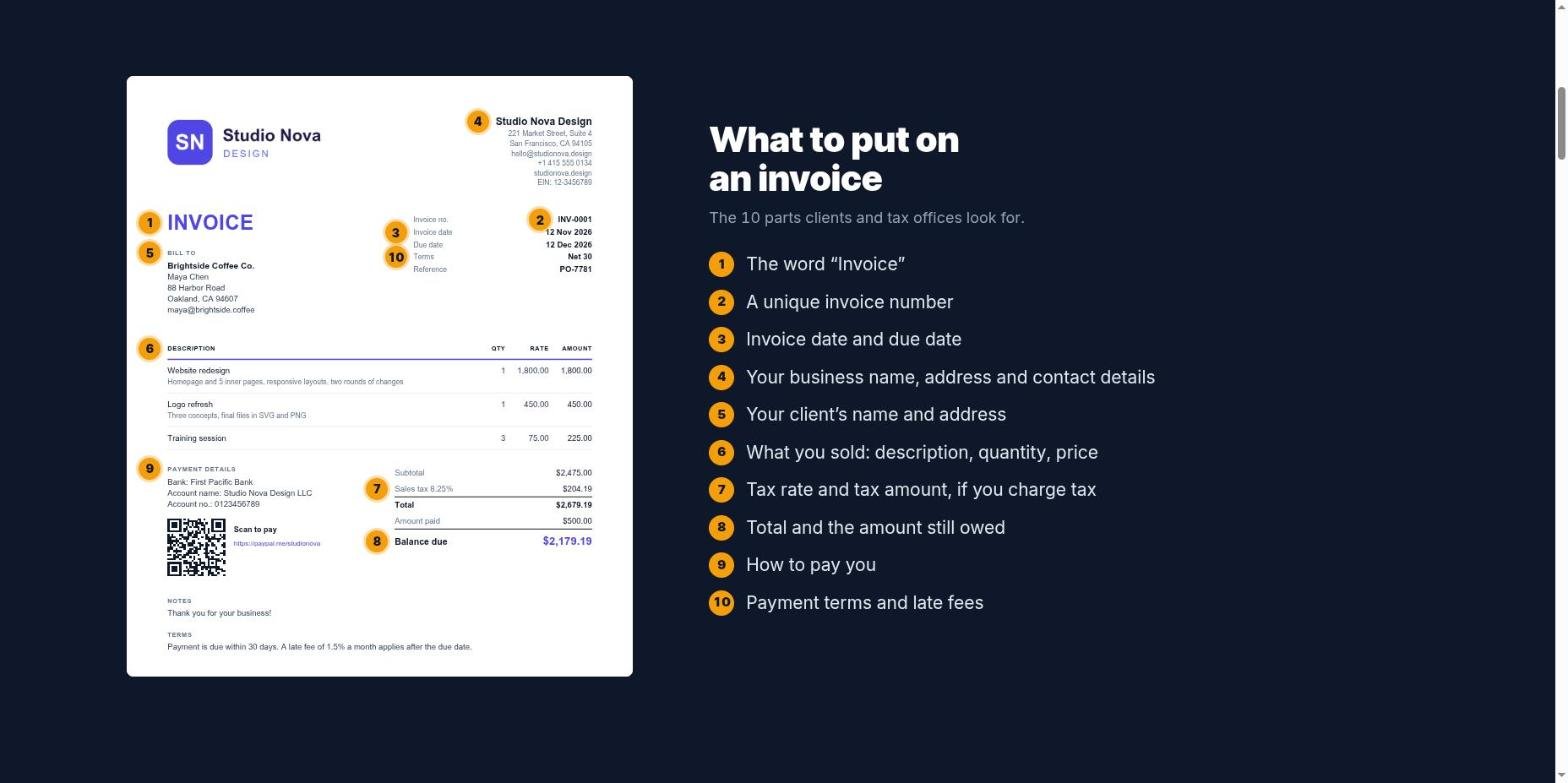
| Part | What to write | Why it matters |
|---|---|---|
| 1. The word “Invoice” | Put it at the top | Tells the client this is a bill, not a quote |
| 2. Invoice number | A unique number, such as INV-0042 | Lets you and your client track and match payments |
| 3. Dates | Invoice date and due date | Starts the clock on payment |
| 4. Your details | Business or personal name, address, email, phone | Shows who to pay and who to contact |
| 5. Client details | Client or company name and address | Makes sure the right person approves it |
| 6. Line items | Description, quantity, rate and amount for each item | Shows exactly what the client is paying for |
| 7. Tax | Tax name, rate and amount, if you charge tax | Needed for the client to claim the tax back |
| 8. Totals | Subtotal, total, any amount already paid, balance due | Removes any doubt about the amount |
| 9. How to pay | Bank details, payment link or QR code | Makes paying you quick and easy |
| 10. Payment terms | For example “Net 30” and any late fee | Sets clear expectations |
In the UK, for example, GOV.UK lists the essentials: a unique identification number, your company name, address and contact information, the customer’s name and address, a clear description of what you are charging for, the supply date, the invoice date, the amounts charged, VAT if applicable, and the total amount owed.
Extra details when you charge sales tax, VAT or GST
If you are registered for a sales tax, the rules are stricter, because your client uses your invoice to claim the tax back. The details depend on the country:
- European Union: a full VAT invoice needs, among other things, a sequential invoice number, both parties’ names and addresses, the customer’s VAT number where they pay the tax, quantities and unit prices, the VAT rate and the VAT amount.
- United Kingdom: if you and your customer are both VAT-registered, you must use a VAT invoice, which shows more detail than a standard invoice.
- Australia: GST-registered businesses call it a “Tax invoice”. If a customer asks for one, you must provide it within 28 days, unless the sale is $82.50 or less including GST. For sales of $1,000 or more, it must also show the buyer’s identity or ABN.
These are examples, not a full list. Check the rules of the tax office where you are registered, or ask an accountant.
How to make an invoice in 6 steps
Here is the process with the free Invoice Generator. It works in any browser, needs no account, and keeps everything on your own device.
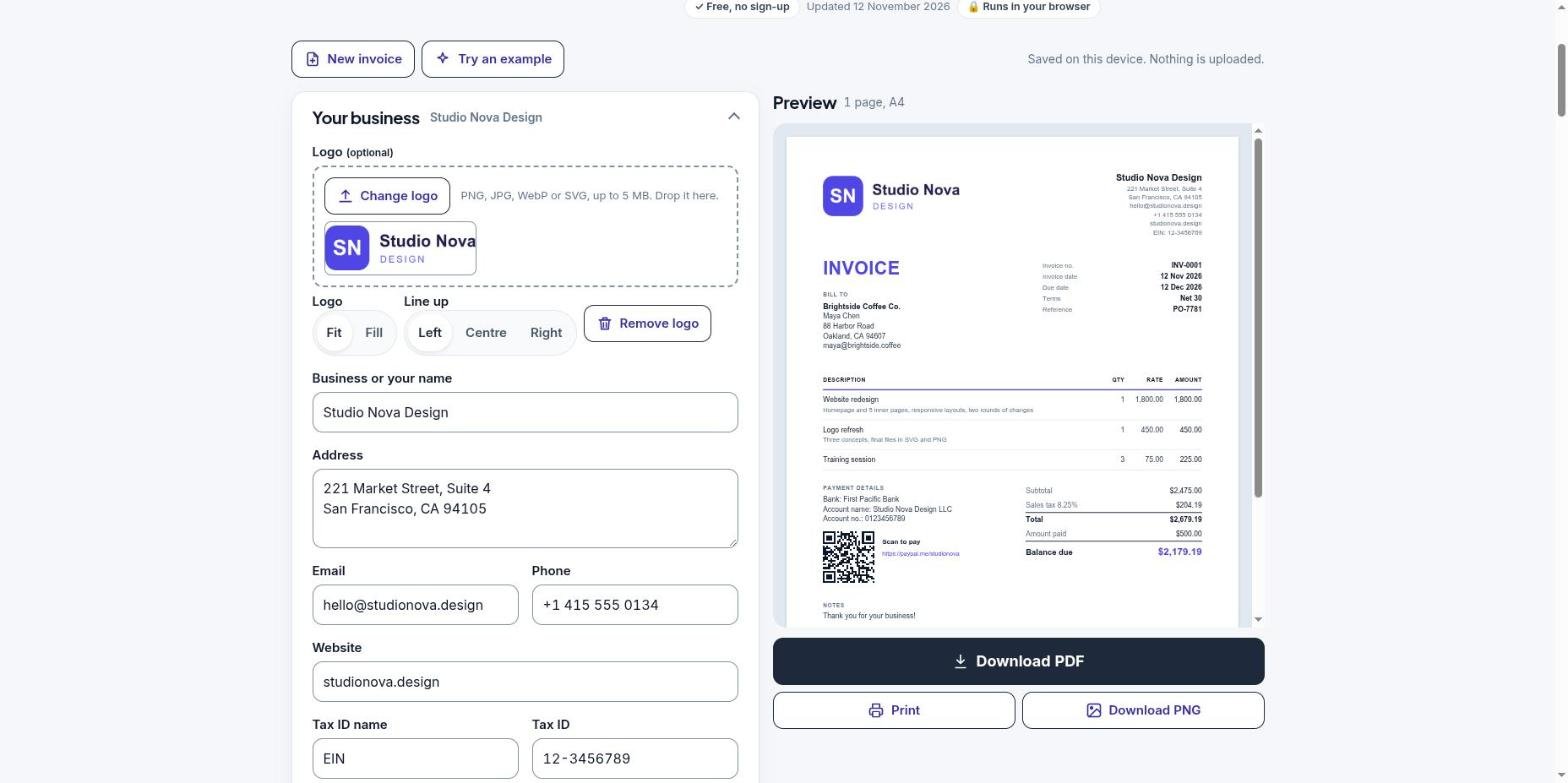
- Add your business details. Upload your logo (PNG, JPG, WebP or SVG) and fill in your name, address, email and tax ID if you have one. The tool remembers these on your device, so you only do this once.
- Add your client. Enter the client’s name, contact person and address. Save them to your client list to reuse next time.
- Set the number and dates. The tool suggests the next invoice number. Pick payment terms such as Net 30, and the due date fills in by itself.
- List what you sold. Add one line per product or service, with a short description, quantity and rate. The amounts and subtotal update as you type.
- Add tax, discounts and deposits. Add one or more named taxes (VAT, GST or sales tax), a discount, a shipping charge or an amount already paid.
- Choose a design and download. Pick a template and colour, check the preview, and press Download PDF.
Worked example
A web designer bills a client for three items, charges 8.25% sales tax and has already received a deposit of 500.00:
| Line | Calculation | Amount |
|---|---|---|
| Website redesign | 1 × 1,800.00 | 1,800.00 |
| Logo refresh | 1 × 450.00 | 450.00 |
| Training session | 3 × 75.00 | 225.00 |
| Subtotal | 2,475.00 | |
| Sales tax | 2,475.00 × 8.25% | 204.19 |
| Total | 2,475.00 + 204.19 | 2,679.19 |
| Amount paid | Deposit | 500.00 |
| Balance due | 2,679.19 − 500.00 | 2,179.19 |
The tax comes to 204.1875, which rounds to 204.19. Always round to the cents your currency uses, and check that the lines add up to the total before you send.
How to number your invoices
Every invoice needs its own number, and you should never use the same number twice. A simple, sequential system works best:
- Simple: INV-0001, INV-0002, INV-0003.
- By year: 2026-001, 2026-002. This keeps numbers short and makes yearly records easy.
- By client: ACME-001, ACME-002. Useful if you bill a few large clients often.
If you make a mistake on an invoice you have already sent, don’t delete it or reuse its number. Issue a credit note to cancel it, then send a new invoice.
Payment terms explained
Payment terms tell your client how long they have to pay. Put them on every invoice, and agree them before you start the work.
| Term | Meaning |
|---|---|
| Due on receipt | Pay as soon as you receive the invoice |
| Net 7 | Pay within 7 days of the invoice date |
| Net 15 | Pay within 15 days |
| Net 30 | Pay within 30 days, a common default for business clients |
| Net 60 | Pay within 60 days, often asked for by large companies |
Shorter terms usually mean faster payment. If you add a late fee, state it clearly in your terms, for example “A late fee of 1.5% a month applies after the due date”, and check that the law where you work allows it. To work out a due date by hand, see how to calculate days between two dates.
Choose an invoice template
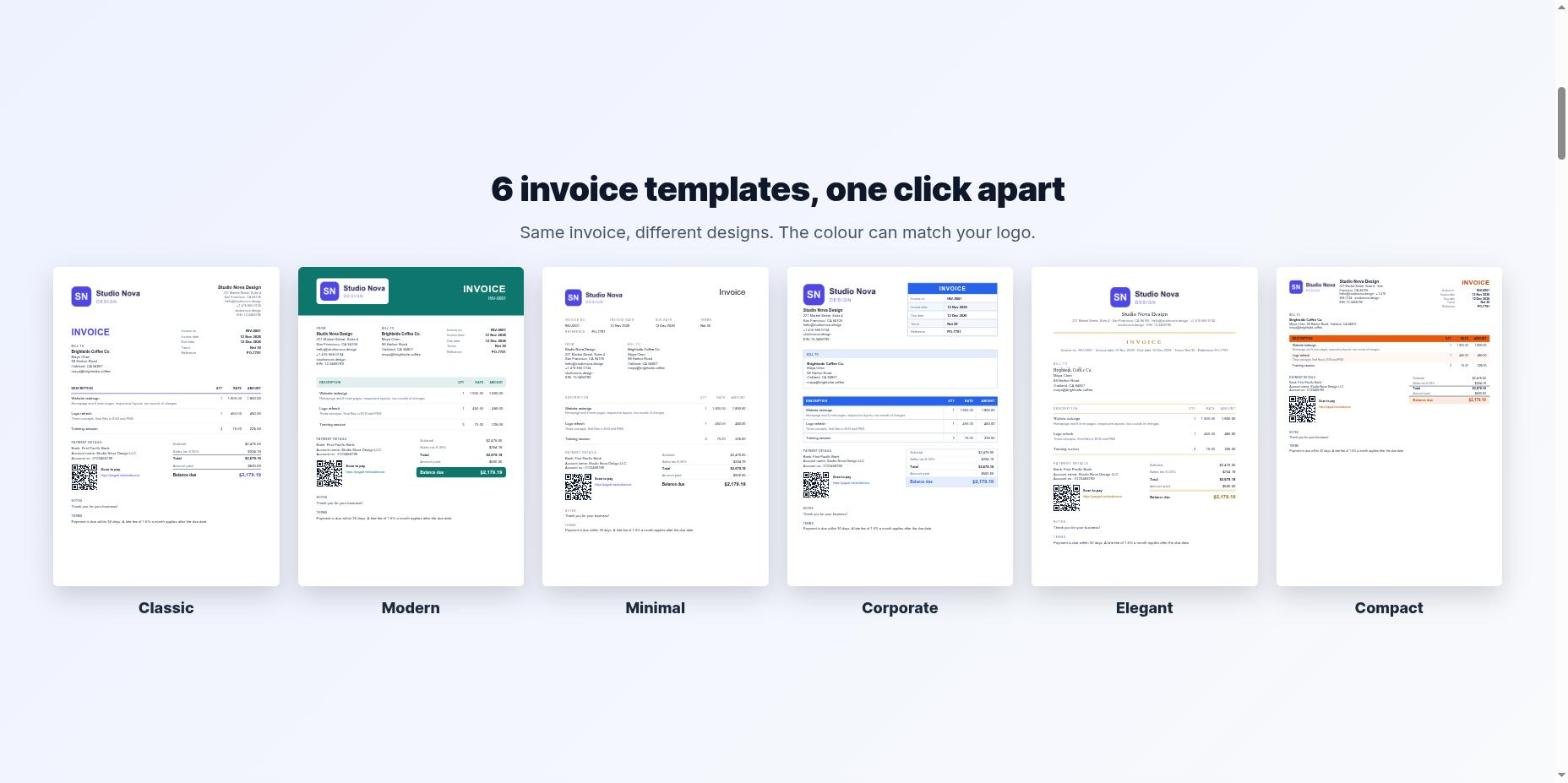
| Template | Good for |
|---|---|
| Classic | Any business. Safe, clear and familiar |
| Modern | Freelancers and agencies who want a bold, branded look |
| Minimal | Designers, writers and consultants who like a clean page |
| Corporate | Companies that send formal invoices to large clients |
| Elegant | Creative studios, events, photography and consulting |
| Compact | Long invoices with many line items |
Keep one template for all your invoices, so clients recognise them at once. The Invoice Generator can match the colour to your logo automatically.
How to send an invoice and get paid faster
- Send a PDF. It looks the same on every device, and clients can forward it to their accounts team.
- Write a clear subject line, such as “Invoice INV-0042 from Studio Nova, due 12 December”.
- Make paying easy. Add your bank details and a payment link. A QR code lets clients pay from their phone.
- Send it promptly, on the day you finish the work or reach the agreed milestone.
- Ask for a deposit on big projects, and show it on the final invoice as “Amount paid”.
- Follow up politely: a reminder a few days before the due date, then on the due date, then a week after.
Common invoice mistakes to avoid
- Missing or repeated invoice numbers. They cause confusion and problems with your records.
- Vague descriptions such as “work done”. Say what you delivered and for which period.
- No due date. Without one, many clients pay when it suits them.
- Wrong tax. Don’t add VAT, GST or sales tax unless you are registered to charge it.
- Maths errors. Use a tool that calculates totals for you, then check them once.
- Sending to the wrong person. Ask who approves invoices at the client’s company, and whether they need a purchase order (PO) number on it.
Invoice, quote, proforma, receipt or credit note?
| Document | When to use it |
|---|---|
| Quote / estimate | Before the work, to agree the price |
| Proforma invoice | Before delivery, to request a deposit or for customs |
| Invoice | After delivery, to request payment |
| Receipt | After payment, to confirm you received the money |
| Credit note | To cancel or reduce an invoice you already sent |
The Invoice Generator makes all five. Choose the document type under Invoice details.
Billing by the hour? Add up your hours first with our guide on how to calculate hours worked with a lunch break. Freelancers paid from abroad can check what reaches their bank with the Freelancer Take-Home Calculator.
Make your invoice now
Free, no sign-up and no watermark. Your details never leave your device.
Invoice overdue? Follow our day-by-day plan for when a client won’t pay, with five email templates and the late-payment rules for the US, UK, EU and India.
Frequently asked questions
How do I make an invoice for free?
Use a free invoice generator such as the OrbitCorner Invoice Generator. Fill in your details, your client and your line items, then download the invoice as a PDF. It needs no account and adds no watermark.
Can I make an invoice without a registered business?
Yes. Freelancers and individuals can send invoices under their own name. Include your name, address and contact details instead of a company name.
What is the best format to send an invoice?
A PDF. It keeps the layout the same on every device and is hard to change by accident.
Do I need to add tax to my invoice?
Only if you are registered to charge VAT, GST or sales tax. If you are not registered, don’t show tax on your invoices.
How do I make an invoice in Word or Excel?
You can build one from a template, but you must work out the totals and keep the numbering yourself. An invoice generator does the maths and numbering for you and exports a PDF.
What should I do if a client doesn’t pay?
Send a polite reminder with the invoice attached, then follow up by phone. If the invoice stays unpaid, check the late payment rules where you work or get legal advice.