How Much Data Does Streaming Use Per Hour?
A video call, a playlist and an evening of Netflix can use very different amounts of data. One hour of music on Spotify uses less than 0.15 GB. One hour of Netflix in 4K can use up to 7 GB, about fifty times as much.
This guide gives you the numbers for the apps people use most, explains where each number comes from, and shows you how to make a monthly data plan last.
Short answer: Music streaming uses about 40 to 150 MB per hour. Video uses far more: from about 0.3 GB per hour in basic quality up to 3 GB per hour in HD and 7 GB per hour in 4K on Netflix. A one-to-one video call in 720p uses roughly 1 GB per hour.
Streaming data usage at a glance
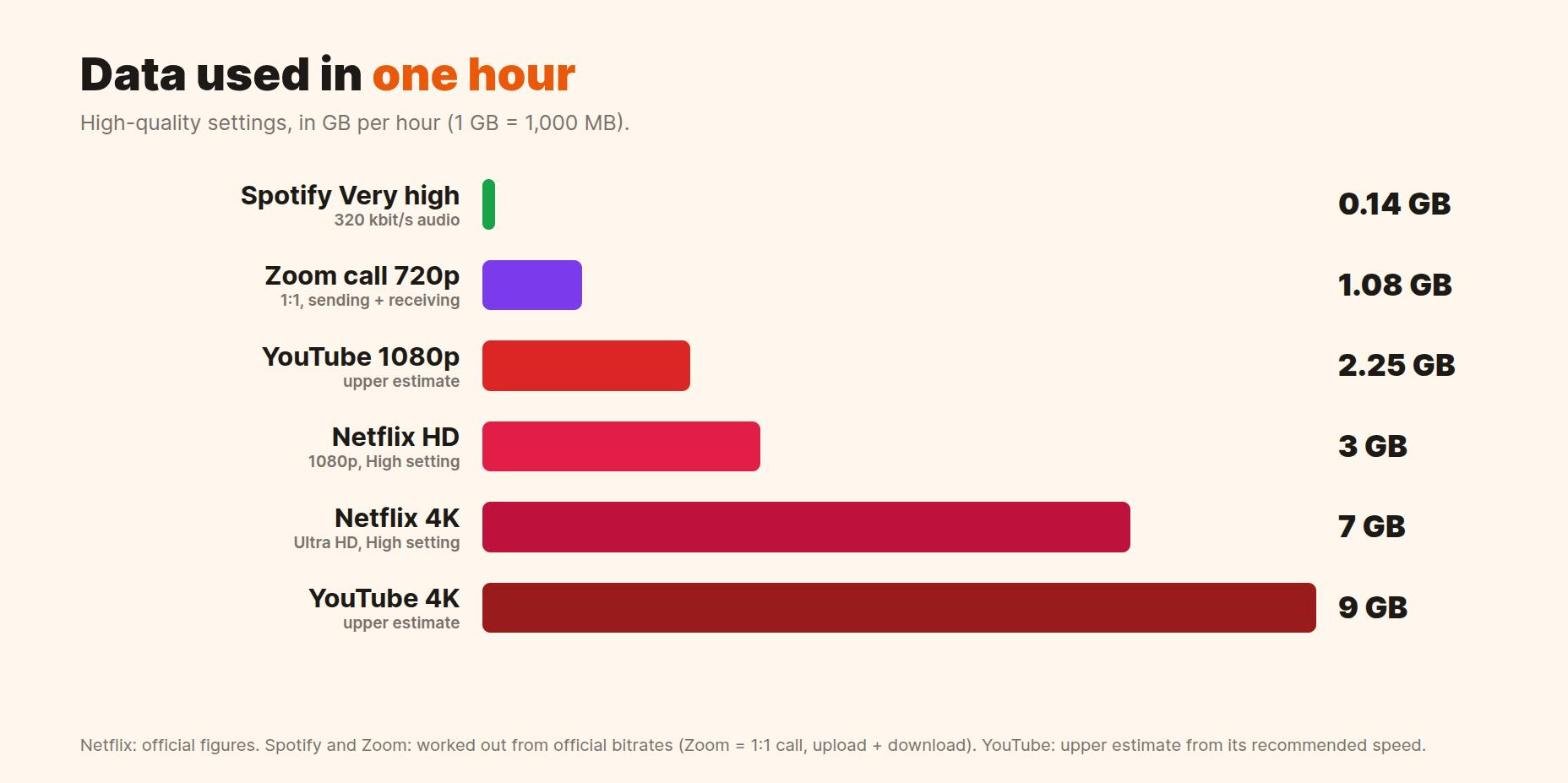
| Activity | Quality | Data per hour |
|---|---|---|
| Spotify music | Low (~24 kbit/s) | about 11 MB |
| Spotify music | Normal (~96 kbit/s) | about 43 MB |
| Spotify music | Very high (~320 kbit/s) | about 144 MB |
| Zoom call (1:1) | Audio only | about 54 to 72 MB |
| Zoom call (1:1) | 720p HD video | about 1.1 GB |
| YouTube | 480p | up to about 0.5 GB |
| YouTube | 1080p | up to about 2.25 GB |
| Netflix | Low (basic quality) | up to 0.3 GB |
| Netflix | High, HD | up to 3 GB |
| Netflix | High, 4K Ultra HD | up to 7 GB |
Netflix publishes its own per-hour figures. Spotify and Zoom publish bitrates, and we converted those to megabytes per hour. YouTube publishes the connection speed it recommends for each quality, which gives a ceiling rather than an exact figure. The next section shows how to do this conversion yourself.
How to work out data use from a bitrate
Most apps describe quality as a bitrate, such as 96 kbit/s or 5 Mbps. To turn a bitrate into data per hour, multiply by 3,600 seconds and divide by 8, because there are 8 bits in a byte.
- For kbit/s: kbit/s × 0.45 = MB per hour. Example: 96 kbit/s × 0.45 = 43.2 MB per hour.
- For Mbps: Mbps × 0.45 = GB per hour. Example: 5 Mbps × 0.45 = 2.25 GB per hour.
This shortcut works for any app that lists a bitrate, so you can check new services yourself.
Netflix
Netflix lets you pick a data setting for each profile in a browser, and a separate one in the mobile app. These are its official figures, per hour and per device:
| Setting | What you get | Data per hour |
|---|---|---|
| Low | Basic video quality | up to 0.3 GB |
| Medium | Standard video quality | up to 0.7 GB |
| High | Standard definition | up to 1 GB |
| High | High definition | up to 3 GB |
| High | Ultra HD (4K) | up to 7 GB |
On phones and tablets, the Netflix app has its own setting. Save Data gives about 6 hours per GB, Automatic about 4 hours per GB, and Maximum Data can use 1 GB every 20 minutes or more. To change it, open the app, tap My Netflix, then your profile name, then App Settings.
YouTube
YouTube adjusts quality to your connection, and it does not publish data-per-hour figures. It does list the sustained internet speed it recommends for each resolution. Converting those speeds gives you a safe upper estimate:
| Resolution | Recommended speed | Upper estimate per hour |
|---|---|---|
| 360p | 0.7 Mbps | about 0.3 GB |
| 480p | 1.1 Mbps | about 0.5 GB |
| 720p | 2.5 Mbps | about 1.1 GB |
| 1080p | 5 Mbps | about 2.25 GB |
| 4K | 20 Mbps | about 9 GB |
Real use is often lower, because the recommended speed includes some headroom and many videos are simple to compress. Treat these figures as a ceiling for planning. On a phone, choosing 480p instead of Auto is one of the easiest ways to save data.
Spotify and other music apps
Music uses very little data compared with video. Spotify lists these quality levels for its desktop and mobile apps:
| Spotify setting | Bitrate | Data per hour |
|---|---|---|
| Low | ~24 kbit/s | about 11 MB |
| Normal | ~96 kbit/s | about 43 MB |
| High | ~160 kbit/s | about 72 MB |
| Very high (Premium) | ~320 kbit/s | about 144 MB |
| Lossless (Premium) | up to 24-bit/44.1 kHz FLAC | several hundred MB |
Lossless audio is the exception. FLAC files are much larger than the other settings, so keep lossless for Wi-Fi or for downloads. Video podcasts and music videos also use far more data than audio alone. Spotify lets you switch on audio-only streaming for video podcasts.
Video calls (Zoom and similar apps)
A video call uses data in both directions: you download the other person’s video and upload your own. Zoom lists these bandwidth needs for one-to-one calls:
| Call type | Bandwidth (up / down) | Data per hour, both directions |
|---|---|---|
| Audio only | 60 to 80 kbit/s | about 54 to 72 MB |
| High-quality video | 600 kbit/s / 600 kbit/s | about 0.54 GB |
| 720p HD video | 1.2 Mbps / 1.2 Mbps | about 1.1 GB |
| 1080p HD video | 3.8 Mbps / 3.0 Mbps | up to about 3 GB |
Group calls in gallery view use more, because you receive several video feeds at once. If your data is running low, turn off your camera. Audio-only calls use a small fraction of the data.
How long does 1 GB last?
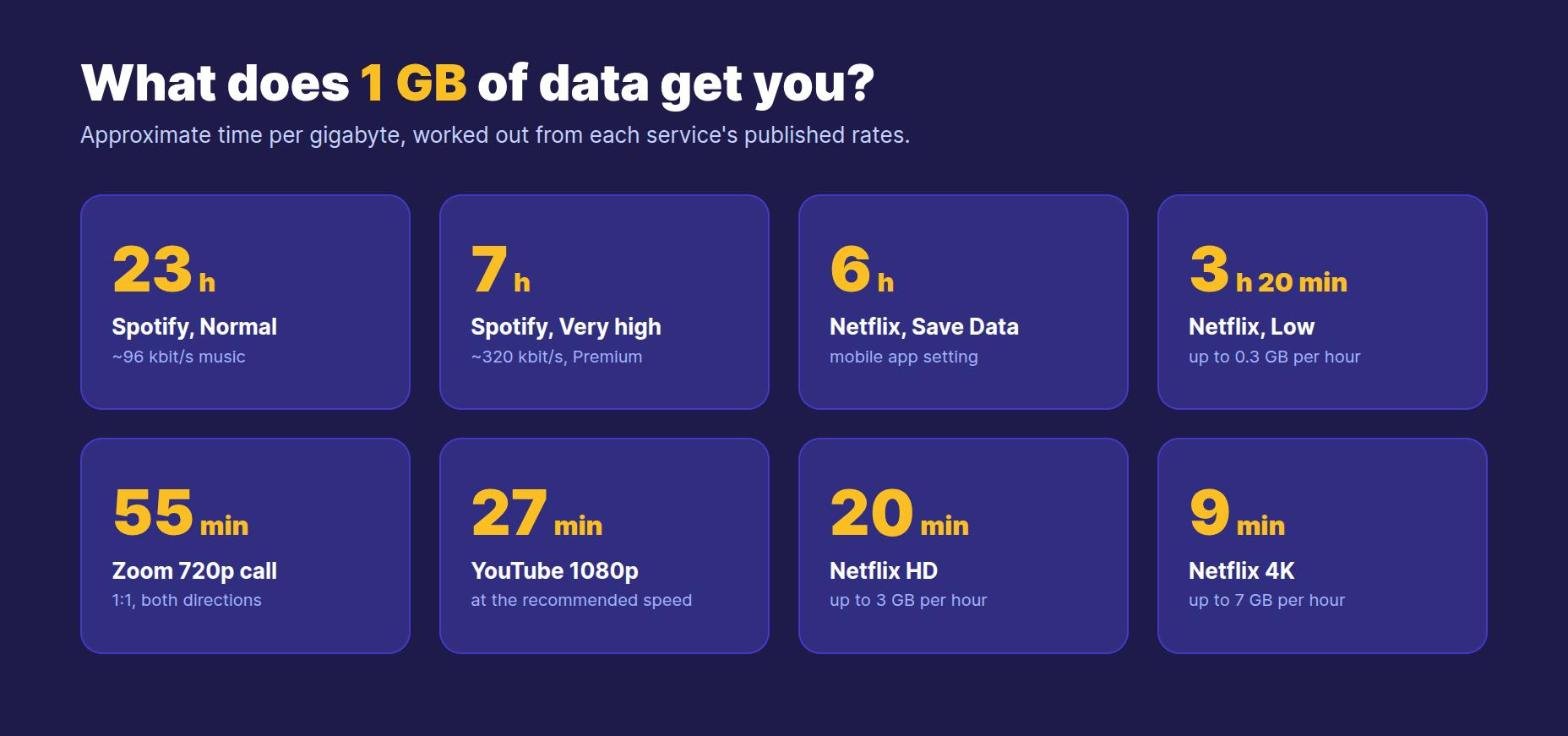
To estimate your own month, multiply your daily viewing by 30. For example, one hour of Netflix in HD every evening could use up to 90 GB a month. The same hour on the Netflix Low setting uses up to 9 GB.
How to check which apps use the most data
Your phone keeps a per-app data counter, so you can see exactly where your allowance goes:
- iPhone: open Settings, tap Cellular (or Mobile Data) and scroll down to the list of apps. You can switch off mobile data for any app there.
- Android: open Settings, tap Network and internet, then SIMs or Internet, and open App data usage. Menu names vary by phone maker. You can also set a data warning or a hard limit.
Your mobile carrier’s count is the one that matters for your bill, and it can differ slightly from the phone’s count.
Eight ways to stream on less data
- Set video quality yourself. Use Netflix Save Data on mobile, and choose 480p on YouTube.
- Download on Wi-Fi. Netflix, YouTube Premium and Spotify Premium let you download for offline viewing or listening. Downloads count against Wi-Fi, not your mobile plan.
- Switch off downloads over mobile data in Spotify and other apps, so a big download does not start on the go.
- Turn off autoplay. Autoplay keeps streaming after the thing you chose to watch or hear has ended.
- Use audio-only for video podcasts and for long calls when video adds little.
- Turn on your phone’s data saver. iPhone has Low Data Mode and Android has Data Saver. Both limit background data.
- Watch out for Wi-Fi Assist on iPhone. It switches to mobile data when the Wi-Fi signal is weak, which can use data without you noticing.
- Check the per-app counter weekly for the first month on a new plan, so you know your real habits.
Frequently asked questions
How much data does 1 hour of streaming use?
It depends on what you stream. One hour of music uses about 40 to 150 MB. One hour of video uses about 0.3 GB in basic quality, up to 3 GB in HD and up to 7 GB in 4K on Netflix.
Is 10 GB a month enough for streaming?
For music, easily: 10 GB covers more than 200 hours at Spotify Normal quality. For video it is tight. 10 GB gives about 3 hours of Netflix in HD, or about 33 hours on the Low setting.
Does streaming use more data than downloading?
No. Watching the same video at the same quality uses about the same data either way. The difference is when you use it: download on Wi-Fi and you save your mobile data.
Does a 4K TV use more data?
Only if you stream in 4K. A 4K TV that plays HD content uses the HD amount. Netflix 4K uses up to 7 GB per hour, compared with up to 3 GB for HD.
Why is my data running out faster than these numbers?
Apps often pick the highest quality your connection allows, and autoplay, background updates and photo backups add more. Check your phone’s per-app counter to find the cause.
Do video calls use more data than Netflix?
Not usually. A 720p one-to-one Zoom call uses about 1.1 GB per hour in total, while Netflix in HD can use up to 3 GB per hour. Group calls in gallery view use more than one-to-one calls.
Sources
- Netflix Help Center: How to control how much data Netflix uses
- YouTube Help: System requirements (recommended speeds)
- Spotify Support: Audio quality
- Spotify Support: Internet and data usage
- Zoom Developer Docs: System requirements and bandwidth
- Apple Support: Use cellular data on your iPhone or iPad
- Google Pixel Help: Reduce and manage mobile data usage