US Visa Photo Size: 600×600, Under 240 KB, and the 54 KB Rule (DS-160 Guide)
The US visa application (DS-160) and the Diversity Visa (green card) lottery both ask you to upload a digital photo. Before anyone looks at your face, the system checks the file: its shape, pixel size, format and weight. A perfectly nice photo can fail in seconds.
Here are the exact digital requirements from the U.S. Department of State, a little-known rule that rejects photos that are too small, and how to make your photo fit in about a minute.
Short answer: A square JPEG, between 600 × 600 and 1200 × 1200 pixels, no larger than 240 KB, in colour, with compression no stronger than 20:1. For a 600 × 600 photo, that means aiming for roughly 54–240 KB. Our US visa photo preset sets all of this in one tap.
The official digital photo requirements
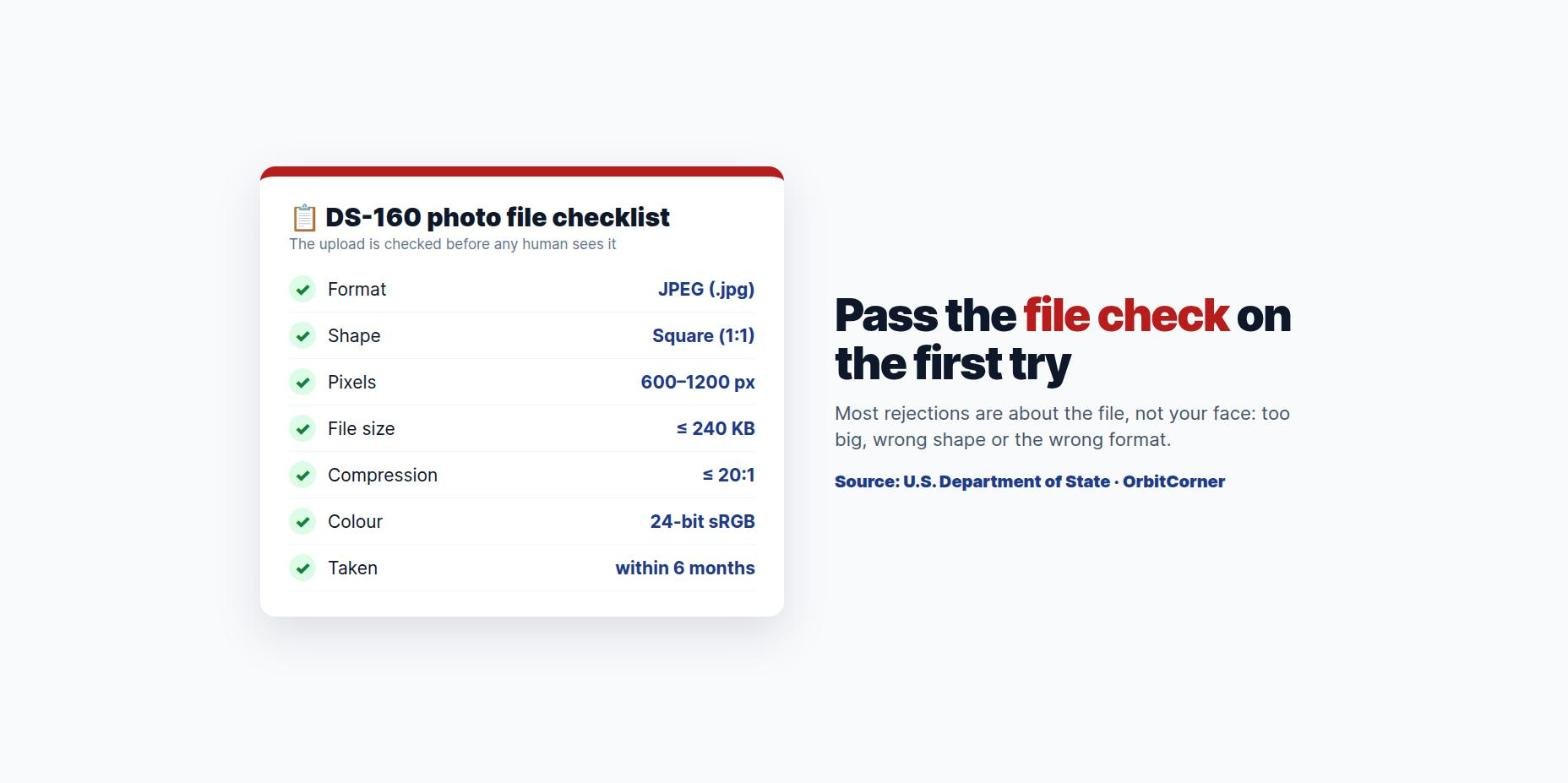
| Requirement | What it must be |
|---|---|
| Shape | Square: height equals width |
| Pixels | At least 600 × 600, at most 1200 × 1200 |
| Format | JPEG (.jpg) |
| File size | 240 KB or less |
| Compression | A ratio of 20:1 or less |
| Colour | Full colour, 24 bits per pixel, sRGB |
| Scanned prints | 2 × 2 inch photo scanned at 300 pixels per inch |
The hidden 54 KB minimum
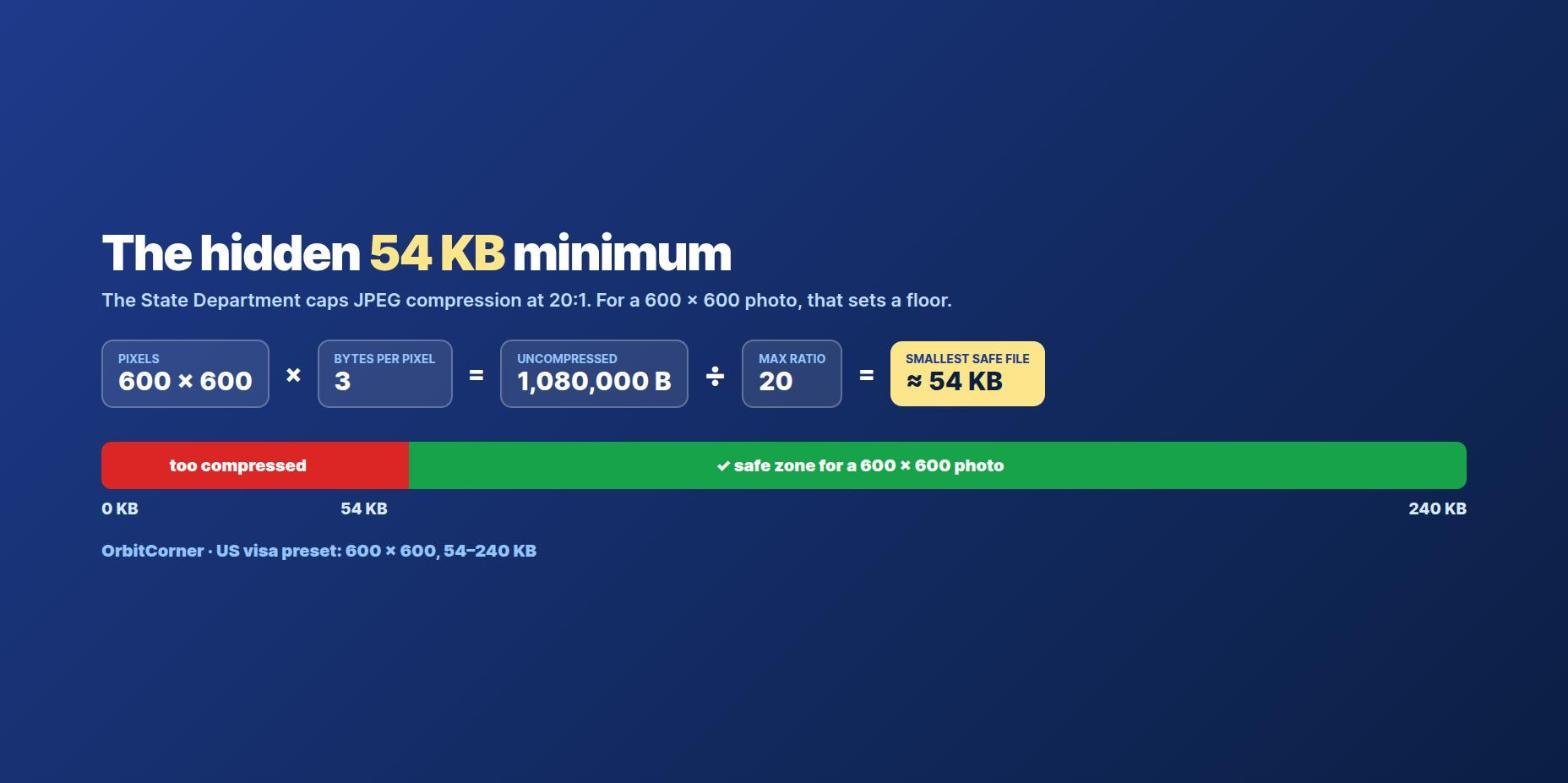
Most people focus on the 240 KB maximum and squeeze their photo as hard as possible. But the State Department also says the compression ratio must not exceed 20:1. Here is what that means in practice:
- A 600 × 600 colour photo has 360,000 pixels, and each pixel takes 3 bytes uncompressed: 1,080,000 bytes.
- Divide by 20 and you get 54,000 bytes, or about 53 KB.
- So a 600 × 600 JPEG smaller than about 54 KB is compressed more than 20:1, and risks being flagged as over-compressed.
For a larger photo the floor is higher. A 1200 × 1200 photo would need about 210 KB to stay within 20:1, which leaves very little room under the 240 KB cap. That is why 600 × 600 is the easiest size to get right: it gives you a comfortable window between about 54 KB and 240 KB.
How to make your photo fit in one minute
- Open the Compress Image to KB tool and add your photo.
- Tap US visa photo. This sets exactly 600 × 600 pixels, crop to fill, and a 54–240 KB range.
- Press Compress photo. The tool keeps the highest quality that fits, and always saves a JPEG.
- Check that your face is centred after the crop, then download and upload it to the DS-160 or DV entry form.
If your face is not centred after the square crop, crop the photo yourself first so your head is in the middle with a little space above. The State Department also offers its own free photo tool for cropping to 600 × 600.
Make your US visa photo the right size
One tap sets 600 × 600 pixels and 54–240 KB. Free, and your photo is never uploaded.
What the photo itself must look like
Passing the file check is step one. A consular officer still reviews the photo itself. The key rules from the State Department are:
- Taken within the last 6 months, showing how you look now.
- Plain white or off-white background.
- Full face, centred, facing the camera, with a neutral expression and both eyes open.
- Head between 1 inch and 1⅜ inches (25–35 mm) from chin to top of hair on a 2 × 2 inch photo, which is about 50–69% of the image height.
- No eyeglasses since 1 November 2016, except in rare medical cases.
- No filters, beauty edits or other digital changes to your appearance.
A note for the Diversity Visa (green card) lottery
DV entries use the same digital photo rules. Every person on the entry needs their own recent photo, and photos reused from a previous year’s entry, or that do not meet the specifications, lead to disqualification. Entry periods and instructions are announced each year on the official site, dvprogram.state.gov, so check there for the current dates. Entering is free, so be wary of sites that charge to “submit” for you.
Why the DS-160 might still reject your photo
- File too large: bring it under 240 KB, ideally by using 600 × 600 pixels rather than very low quality.
- Not square: crop to 1:1 before or during compression.
- Wrong format: renaming a PNG or HEIC to .jpg does not convert it. Save it as a real JPEG.
- Too small in pixels: photos under 600 × 600 are rejected. Do not enlarge a tiny photo; take a new one.
- Over-compressed: stay above about 54 KB at 600 × 600. More fixes in our upload troubleshooting guide.
Quick answers
Is 600 × 600 enough for a US visa photo?
Yes. 600 × 600 is the minimum and is accepted. Anything up to 1200 × 1200 is fine, as long as the file stays at or under 240 KB.
Can I take the photo with my phone?
Yes, if it meets the rules: plain white or off-white wall, even light with no shadows, camera at eye level, no glasses, and the photo cropped to a square.
Is the US passport renewal photo the same?
The look is the same, but the online passport renewal has different file limits. Check the passport pages on travel.state.gov before uploading.
Does the tool change my face or background?
No. It only resizes, crops to the shape you choose and adjusts JPEG compression. It does not edit your appearance, which the rules do not allow anyway.
This guide explains the published technical requirements. It is not legal advice, and final acceptance of any photo is up to the U.S. embassy or consulate.